

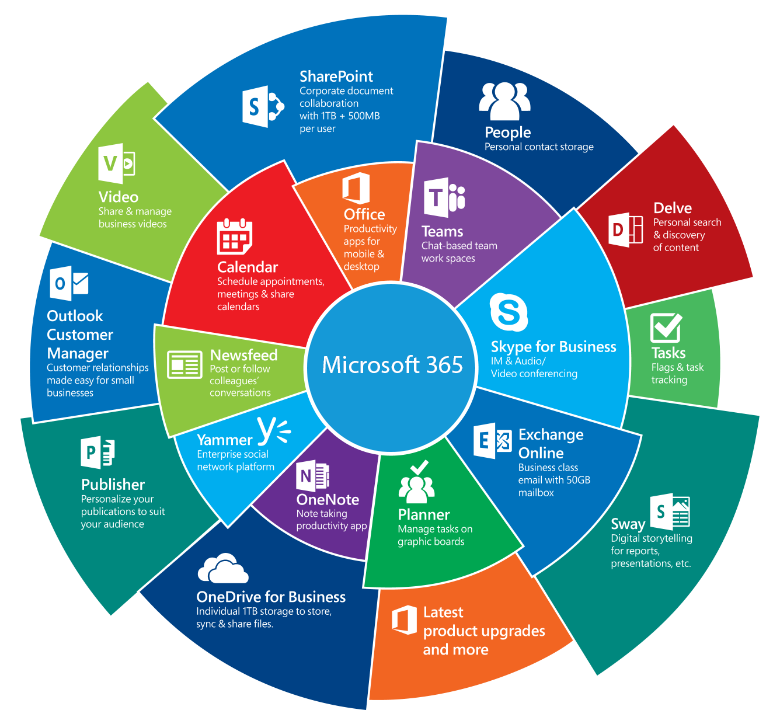
This evolving set of resources contains important information to assist counties in the development, implementation, and management of M365 nonprofit grant resources.
Open Labs sessions will be offered via Zoom, first Thursday of each month at 9AM. (No meeting in July.) These sessions will answer questions, provide guidance, and give counties a platform to share and develop best practices in the use of M365.
Join from PC, Mac, Linux, iOS, or Android:
- https://wsu.zoom.us/j/95130747802?pwd=iWwiTb5yvQtHJbJKEG0E2lxrc1wdIX.1
- Meeting ID: 951 3074 7802
- Passcode: 462256
What is Microsoft 365 (M365)?
Click to add your email to our distribution list
Join distribution list
I would like to receive communications about the WSU MG M365 project including topics, dates and times of future Open Lab Zoom sessions.
Please add my email address to the distribution list.
Open Lab meeting recordings
September 3, 2026
August 6, 2026
March 5, 2026
February 5, 2026
November 6, 2025
October 2, 2025
September 4, 2025
June 5, 2025 (Browser Profiles)
- view only / non-editable
August 7, 2025
Submit a topic request for Open Lab discussion
Click to submit a topic
Open Labs Topic Submission
Use this form to request a discussion topic or submit a question to support team.
Process at a glance
flowchart LR
    A["Get organization buy-in"] --> B["Apply for grant"]
    B --> C["Create first account"]
    C --> D["Register domain <br>"]
    D --> E["Add domain to M365"]
    E --> F["Create user accounts and SharePoint sites"]
Get buy-in:
Why M365 for MGs?
To connect WSU and volunteers; to enable sharing files and information securely.
Grants
A nonprofit grant provides M365 software free of charge to qualifying organizations (such as county foundations).
The available grant provides up to 300 free licenses of Microsoft Business Basic software plus discounts on Microsoft Business Premium licenses.
Learn about recent changes:
Important Note:
For counties that accepted the M365 Business Premium grant, at the expiration of the grant, the Premium licenses will simply expire. All users who may have been using the Premium license and downloaded the Office 365 desktop apps will no longer have access to licensed apps.
Be sure to migrate premium users to a Basic license or purchase Premium (or Standard) licenses at a non-profit discounted price. The upgrade to paid licenses or change to basic licenses is not automatic.
Initial account
Before registering your domain, create a Microsoft account for your M365 ownership.
(After adding the domain, you will create user accounts within M365 for your users.)
Domains
An internet domain is a unique name that identifies a website. You need to register a domain to host M365.
The naming convention for MG website domains is: [County]MG.org
Examples:
ChelanDouglasMG.org
SnohomishMG.org
SkagitMG.org
User accounts
Accounts define what users can see and do.
User accounts provide best access vs guest accounts. Tradeoff is admin workload. Some access is possible without an account.

Two ways to store files (OneDrive vs SharePoint Team site. SP Communication site document library also available.)
Each user has a OneDrive account where they control collaboration.
Storage associated with a SharePoint site is automatically set up for collaboration between members of the site.

Managing multiple accounts
Managing and login into multiple Microsoft accounts can be challenging.
Using browser profiles helps to solve these login issues.

Choosing between different typed of email inboxes

Groups & Security Groups
Microsoft 365 offers different types of groups to support collaboration: SharePoint groups, security groups, and distribution lists.
There is some overlap with Shared Mailboxes.

Advanced topics
Plant Clinic email
Gmail is no longer approved for WSU Plant Clinic email. Create an M365 Shared Mailbox for clinic email.
The naming convention for Plant Clinic email is:
AskAMasterGardener
@[County]MG.org
How to set up clinic mail
How to use clinic mail
Clinic mail rollout samples
Plant Clinic volunteer resources
Create a SharePoint site page for plant clinic resources such as clinic forms and links to important information.
Clinic resource page demo
Clinic intake form
More resources
Coming Attractions
Multi-county collaboration
Coming soon
FAQ
Coming soon